


R&D time from Jira worklogs
CapEx or OpEx for each Jira worklog: a decision tree finance can defend
Also published on Atlassian Community
Free trial on Atlassian Marketplace. Runs on Atlassian, zero egress.

- 16 h CapEx in Nov 2026
- $1,523 at a 100% capitalization rate
"Is this ticket CapEx?" is the wrong question, and it is the one most Jira setups are built to answer. Finance needs the answer per hour of work, because one epic can hold capitalizable development, maintenance and bug fixing after release, often in the same month.
CapRadar is a software capitalization and R&D time app for Jira Cloud from Radrly. This guide walks through classifying worklogs as a decision tree, first with native Jira fields and Automation, then as CapRadar runs it. Which costs qualify under your standard is a call for you and your auditor; CapRadar does not give accounting advice.
The native setup most teams start with
A select field, say Capitalization with the values CapEx and OpEx, sits on the epic. An Automation rule copies it to child work items when they are created, using the Edit work item action with the option to copy the value from the parent. JQL can then find the work, for example Capitalization = CapEx AND worklogDate >= startOfMonth(-1) AND worklogDate <= endOfMonth(-1), and an export gives you the hours.
It is a reasonable first step. Its weak points are predictable. The field has one value for the whole work item, whatever the date of each worklog. Nobody can tell later who changed it and why without digging through History. And a new work item created before the rule ran, or moved between epics, quietly keeps a stale value.
The decision tree
Here is the order to ask the questions in, top to bottom. The first question that gives an answer wins.
1. Has someone made a decision for this exact worklog or work item? A documented exception beats every rule. Natively, this is a comment or a field edit. It needs a reason someone can read a year later.
2. Is it a sub-task? Then it should follow its parent, so a sub-task never ends up CapEx under an OpEx story.
3. Has someone decided for the whole epic or initiative? For example, a pilot epic that finance treats as OpEx regardless of the work inside it.
4. Was the work done before funding was authorized? Under ASU 2025-06, which is effective for annual periods beginning after 15 December 2027 with early adoption permitted, capitalization starts once management has authorized funding and completion is probable. Work before that date, or while significant development uncertainty remains, is expense.
5. Does a rule describe this kind of work? Bugs after release as OpEx, maintenance labels as OpEx, development stories as CapEx. When two rules match, a rule needs a clear winner.
6. What phase was the epic in on the day of the work? Under ASC 350-40 stages or IAS 38 research and development, the phase on the work date decides, which is why per-worklog dates matter.
7. Nothing matched? Then the honest answer is "not classified yet". A default of CapEx inflates the asset. A default of OpEx hides work that should be reviewed.
Native Jira can approximate steps 2, 3 and 5 with fields and Automation. Steps 4, 6 and 7 need dates per worklog, which a work item field cannot hold.
How CapRadar runs the same tree
CapRadar classifies each worklog as CapEx, OpEx, Excluded or Unclassified in that order: worklog override, work item override, parent class for sub-tasks, epic override, initiative override, the ASU 2025-06 gate on the funding authorization date and uncertainty window, the highest-priority rule, the epic phase on the work date, and finally the policy default, which is Unclassified so nothing is capitalized by accident.
Rules combine conditions on space, work type, label, component, a custom field or a subset of JQL. Conditions are combined with AND; several values inside one field are OR. Each rule has an explicit priority, and ties go to the more specific rule, then the older one. Rules are never edited in place: to change an outcome you add a rule with a higher priority, and every result records the rule ID and version. Before you save, the simulator runs the rule against up to 1,500 worklogs of the period and shows the hours that change class and the change in CapEx cost. Locked periods never change.
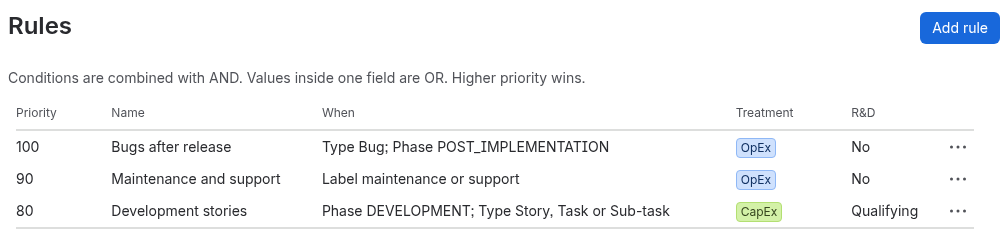
Overrides need a reason of 10 to 500 characters and can carry a reference, such as a board decision. Phases carry an evidence note too, for example the date of the approval.
Whatever reaches the bottom of the tree lands on the To classify screen, grouped by epic. Unclassified hours block the month-end lock unless a finance admin waives them with a reason, so they cannot slip through.
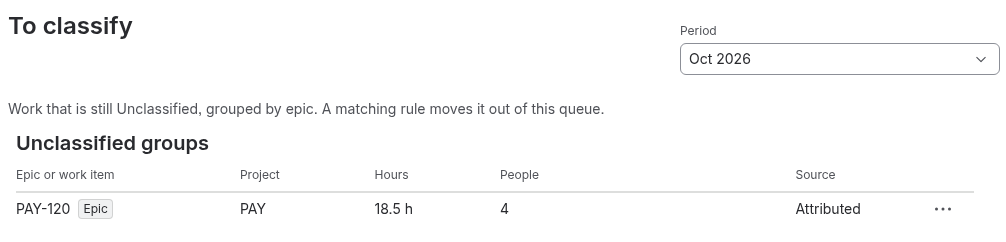
On each work item, a Capitalization panel shows the decision path, such as the epic the override came from or the rule and its priority. The class lives in CapRadar, so it is not searchable with JQL. Multiple policies with space assignment and a simulation of a move to another standard are (Advanced).
Quick answers
Why is a CapEx field on the Jira epic not enough?
The field has one value for the whole work item, whatever the date of each worklog. Nobody can tell later who changed it and why without digging through History, and a work item created before the Automation rule ran, or moved between epics, keeps a stale value.
In what order should the CapEx or OpEx questions be asked?
A documented decision for the exact worklog or work item first, then the parent for sub-tasks, then a decision for the whole epic or initiative, then whether the work was done before funding was authorized, then a rule for the kind of work, then the epic phase on the work date. If nothing matches, the answer is not classified yet.
Why should the default be Unclassified rather than CapEx or OpEx?
A default of CapEx inflates the asset and a default of OpEx hides work that should be reviewed. In CapRadar the policy default is Unclassified, and unclassified hours block the month-end lock unless a finance admin waives them with a reason.
Can the CapRadar class be searched with JQL?
No. The class lives in CapRadar, so it is not searchable with JQL. On each work item a Capitalization panel shows the decision path, such as the epic an override came from or the rule and its priority.