


Software capitalization from Jira worklogs: a month-end close calendar your auditor can follow
Also published on Atlassian Community
In this guide
"Show me how this capitalized number ties back to the hours." That request from an auditor is where many software capitalization processes built on Jira run into trouble. The hours are in Jira worklogs. The classification often lives in a spreadsheet someone updated by hand on the last day of the month.
CapRadar is a software capitalization and R&D time app for Jira Cloud from Radrly. Below is a five-day month-end calendar using native Jira, with the gaps marked, and then what CapRadar adds. It does not give accounting, tax or legal advice: what you capitalize and under which standard stays with you and your auditor.
Day 1: agree the cutoff
Pick the time after which worklogs for the closing month are late, and tell the teams. Jira itself has no period lock. Anyone with the Edit Own Worklogs or Delete Own Worklogs permission can change a worklog dated last month, today or in three months. You can narrow those permissions in the permission scheme, though that also blocks people fixing this month's typos.
Day 2: pull the hours
Native options are an issue search export with the time tracking columns, or the REST API. The export gives one row per work item with total time spent, which loses the date and the person of each worklog. For worklog-level data, the REST API returns worklogs per work item and lists worklog IDs updated since a given time, which is also how you catch late edits. Most teams end up with a script and a CSV.
Day 3: classify
This is where the real judgement sits. A common native setup, discussed in several Community threads, is a select field such as Capitalizable on the epic, copied to child work items with an Automation rule. It works until an epic moves from development to post-implementation in the middle of the month, because the field holds one value for every hour on the work item, whatever the date of the worklog. Bugs fixed after release inside a CapEx epic are the classic case.
Day 4: review and sign
Someone in finance checks the totals, looks for hours with no class and for people with no rate, and signs. In a spreadsheet process the evidence of that review is usually an email.
Day 5: post and keep the evidence
You book the journal and archive the workbook. If a worklog for the closed month changes next week, the workbook does not know.
What CapRadar changes in that calendar
CapRadar reads Jira worklogs, including a 24-month backfill, and classifies each worklog as CapEx, OpEx, Excluded or Unclassified. It classifies per worklog, using the work date, so an epic that changes phase on the 14th splits correctly. Rules and policy templates cover ASC 350-40, ASU 2025-06, ASC 985-20 and IAS 38, and anything no rule covers stays Unclassified, so nothing is capitalized by accident. Rates resolve from person to role to team to space.
Prepare moves the period from Open to In review and runs the pre-close checks. Unclassified hours and missing rates block the lock unless a finance admin waives them with a written reason. A CapEx epic without a funding authorization date is a warning only.
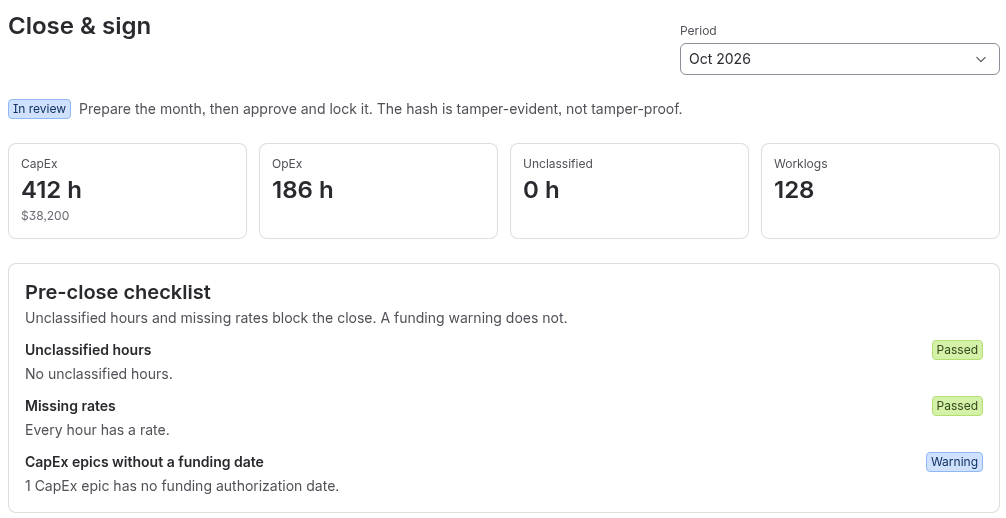
Approve and lock is one step with an attestation, and records the signer, time, time zone and policy hash. On Standard the default is a single-person close, and you can switch it so the approver must be a different person from the preparer. After the lock, a worklog that is added, changed or deleted for that month becomes a post-lock adjustment in the next open period, with its source period, hours and cost. The locked month itself does not change. Reopening needs a reason and keeps the old snapshot.
The CSV pack holds summary, lines, people, rules and audit files plus a manifest with a SHA-256 hash per file, so anyone can check the files with sha256sum. People appear as pseudonymous person keys. The journal file is built from a locked period only, with balanced debit and credit lines per class and cost centre. CapRadar posts nothing to your ledger. Exports of an open period carry the watermark "Draft, not approved".
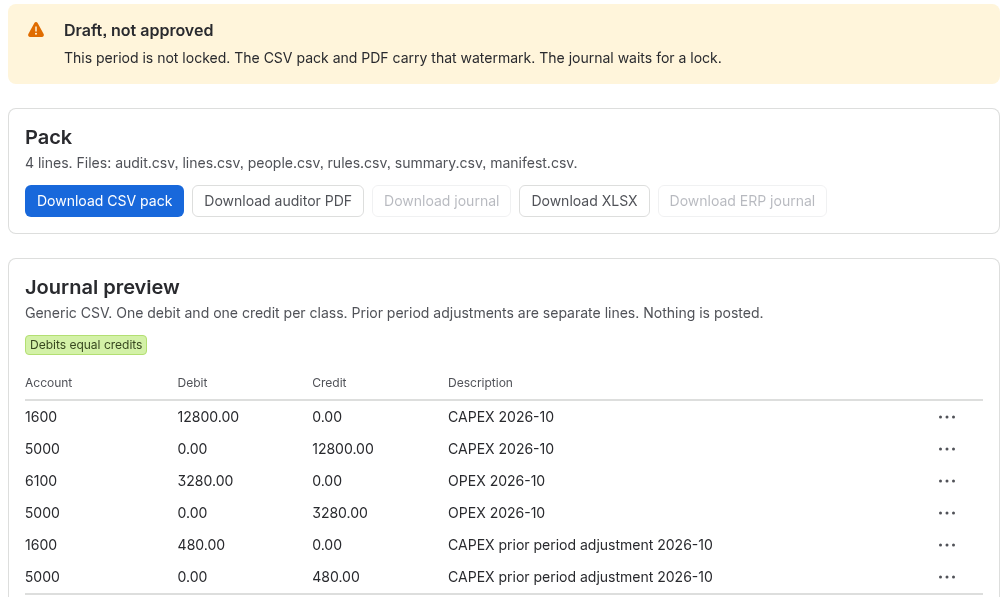
Signed snapshots with a hash chain and Verify, the auditor PDF with a reproducible sample of 25 lines, the review step with separation of duties, XLSX and the ERP journal layout are (Advanced).
Two limits worth knowing. The hash makes a snapshot tamper-evident, which is different from tamper-proof: it shows that something changed. And CapRadar's class is stored in the app, so you cannot search it with JQL.
Quick answers
Can Jira lock worklogs for a closed month?
No. Jira has no period lock. Anyone with Edit Own Worklogs or Delete Own Worklogs can change a worklog dated last month.
Why does a Capitalizable field on the epic break mid-month?
The field holds one value for every hour on the work item, whatever the worklog date, so an epic that changes phase mid-month cannot split its hours.
How does CapRadar classify hours?
Per worklog, using the work date, as CapEx, OpEx, Excluded or Unclassified. Anything no rule covers stays Unclassified, so nothing is capitalized by accident.
Does CapRadar post journals to the ledger?
No. It builds the journal file from a locked period only and posts nothing to your ledger.